
Connect Zira to Claude
Connect Zira to Claude and ask about your operation in plain language — Claude reads your live production data, and can open tasks and post updates for you.
You can now connect Zira to Claude and simply ask about your operation. Claude reads your live Zira data to answer, and — when you allow it — does the work in Zira for you.
No more copying readings into a chat window or pasting answers back out.
Ask in plain language
Once connected, ask the kind of question you would ask a supervisor:
- "Why did the trim saw stall last night? Check its readings around 22:00."
- "What was yesterday's output on line 3?"
- "Show me the open tasks for the Rehovot plant."
Claude finds the right data source by name, looks up the readings, and answers. You do not need to know which metric or device to point it at.
Let Claude do the work
Give a connection permission to act and Claude can open and update tasks, record readings, and post an update to a channel — always asking you before it does.
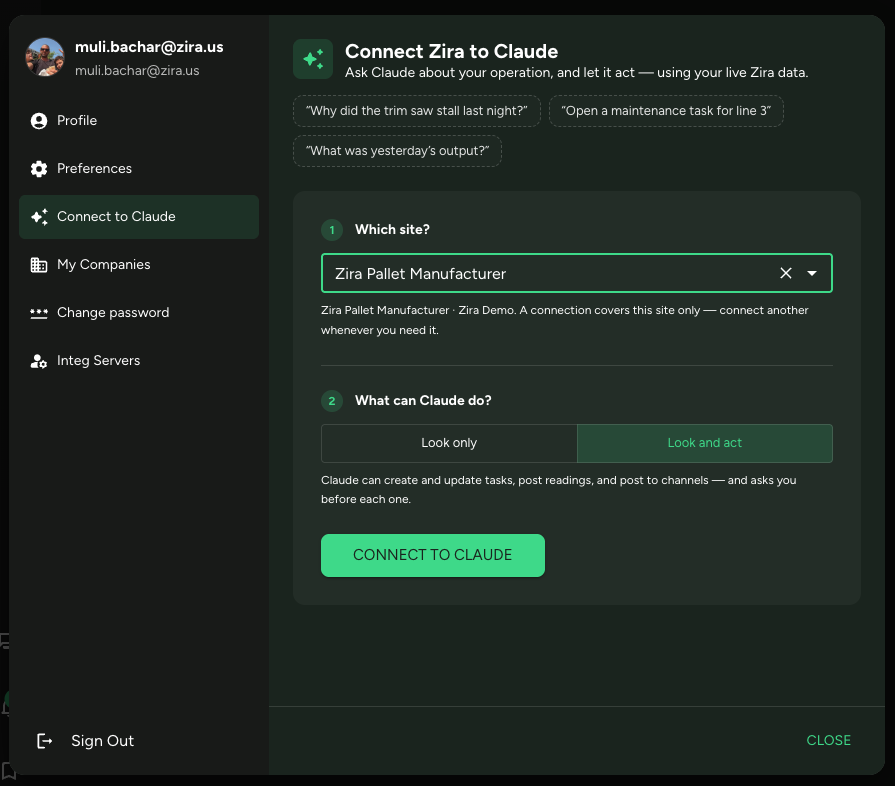
Prefer to start carefully? Choose Look only when you connect, and Claude can answer questions but cannot change anything.
Connecting takes two clicks
Open your profile picture and choose Connect to Claude. Pick the site you want Claude to work with, choose what it may do, and press Connect. Copy the single line Zira gives you, paste it into Claude, and you are done.
Each connection covers one site, so connect each site you want Claude to reach.
Claude can read the guides too
There is a second, separate connection that gives Claude the Zira help center — the product guides, the API reference, and these release notes. It is public and read-only, so it needs no setup beyond the address. Teams that use both get answers grounded in how Zira actually works, not guesswork.