
Run Zira from Claude and Codex (Beta)
Install the Zira plugin in Claude or Codex and control Zira from your AI chat. Ask about your production data, check your device fleet, schedule reports, manage tasks, build dashboards and forms, and set up Vision devices in plain words.
Your AI chat is now a control room for Zira. Install the Zira plugin in Claude or Codex, and ask about your plant in plain words: your production data, device health, tasks, dashboards or device setup. When you want something done, just say so.
Zira signs in as you, sees only what you can see, and asks before it creates or changes anything.
Beta. The Zira plugin is in beta. To try it with your team, request access at sales@zira.us.
Install from the marketplace
Find Zira in the plugin marketplace of Claude or Codex and click Install. Sign in with your Zira account the first time you use it, and pick the site you work with most.
Then type /zira in the chat box to see every Zira action in one list.
Ask about your production
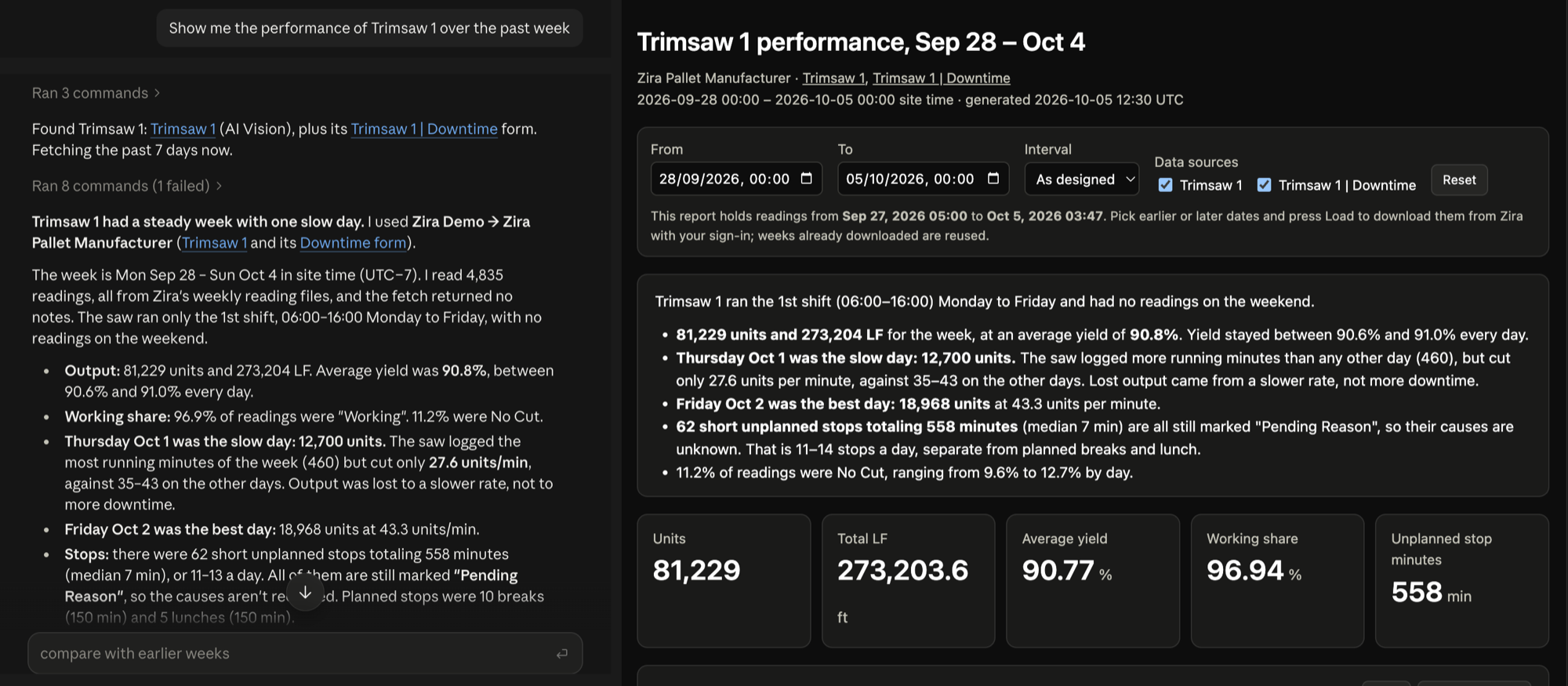
"Show me the performance of Trimsaw 1 over the past week."
Zira answers in the chat and opens an interactive report beside it: a short written summary, the key numbers, and charts you can explore by date, interval and machine.
Save, schedule and share reports
- "Save this report as Trimsaw weekly", then rerun it with fresh data any time.
- "Run Trimsaw weekly every Monday at 7:00", and a new report is ready each week.
- "Share this report with my team", by sending the file or a private link.
- Take any chart into a spreadsheet with CSV or Open in Sheets.
How accurate is your Vision model?
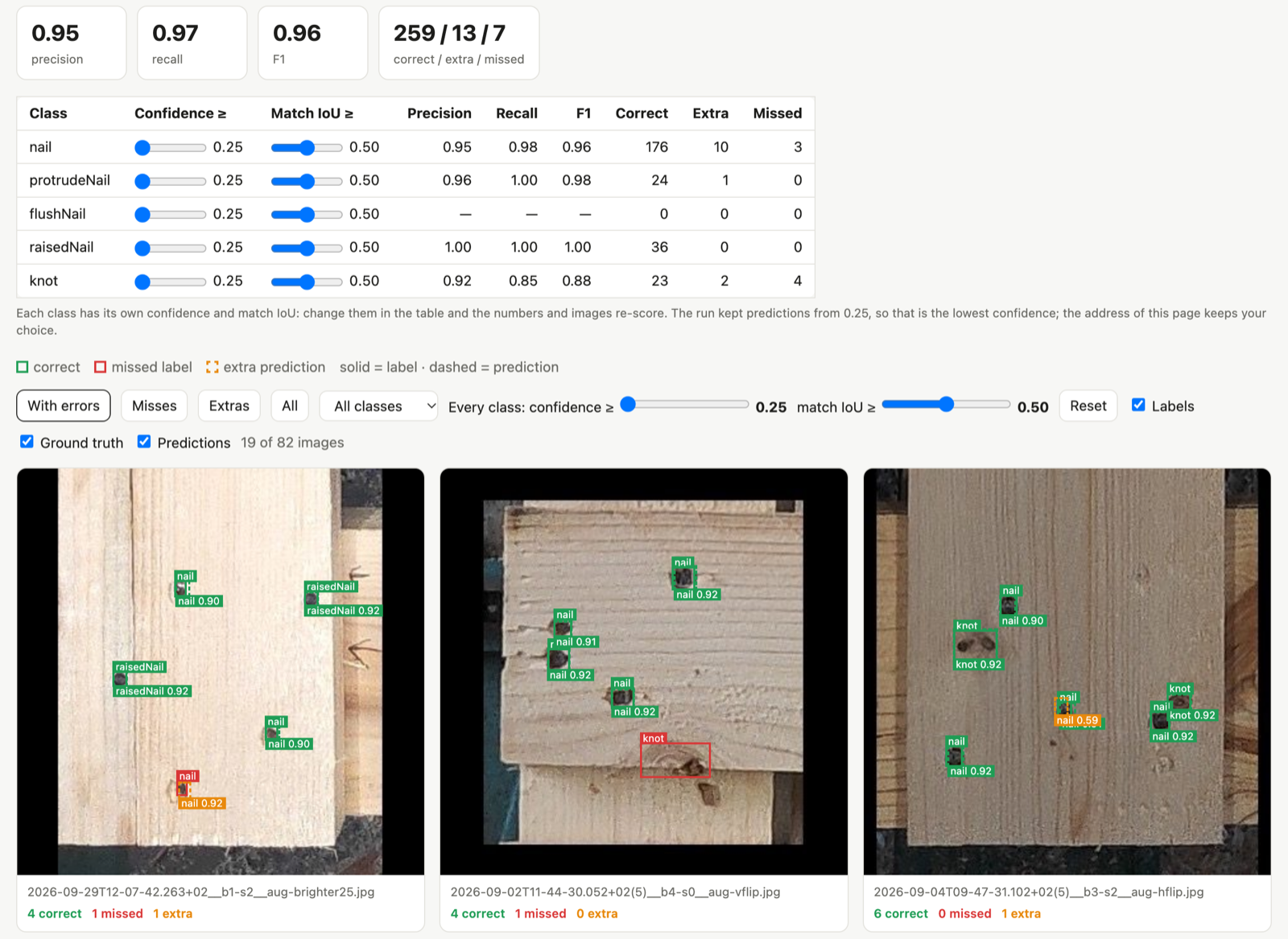
"How accurate is the newest model on Bandsaw 1?"
Zira picks up the camera's dataset and model, runs the model on your computer, and opens an evaluation report: precision and recall for every class, and every image marked up with what the model got right, missed or added. Change a class's confidence threshold and the scores update live. Nothing is uploaded or changed in Zira.
Your device fleet at a glance
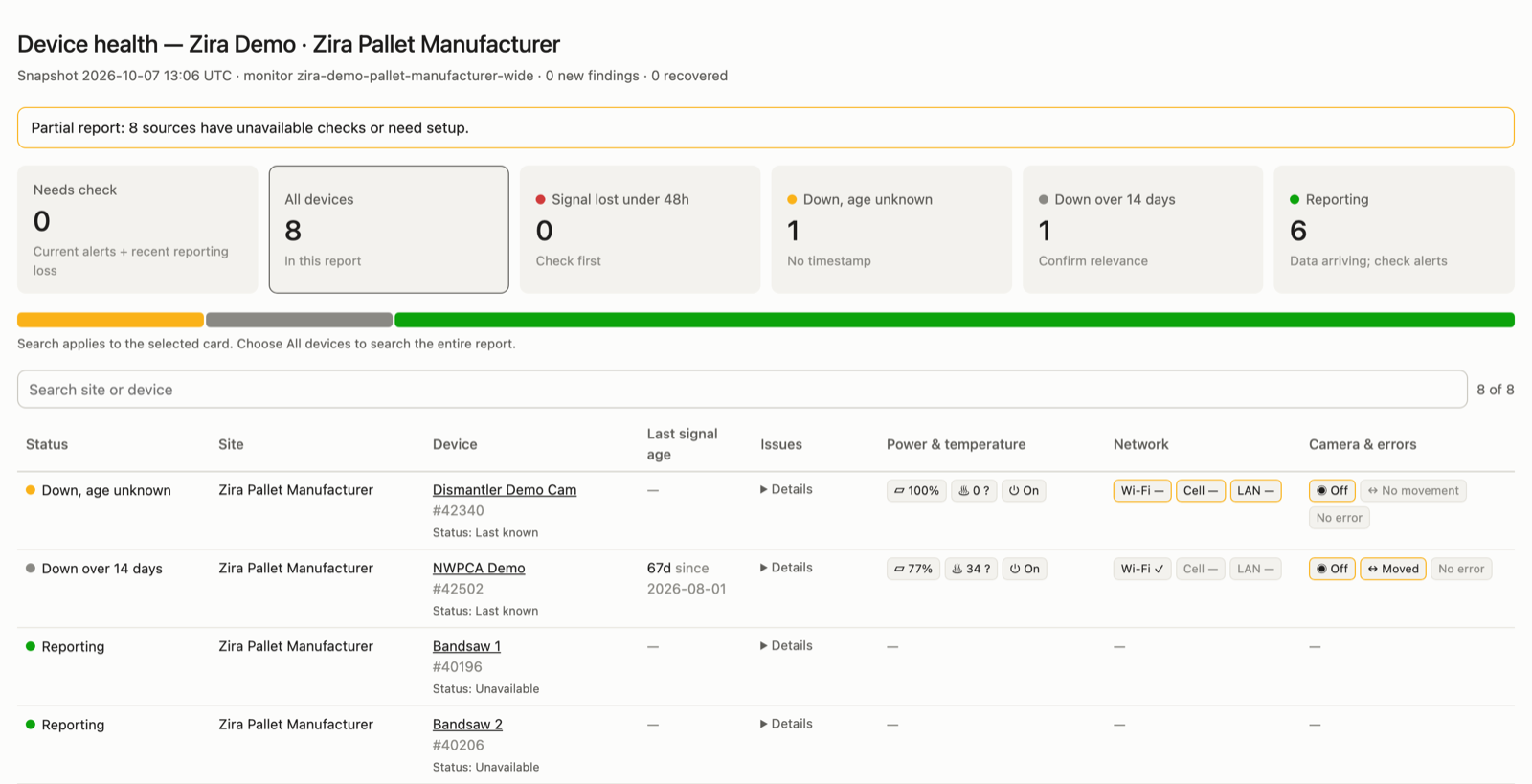
"Show me the health of my device fleet."
A health dashboard lists the devices that need attention first, such as a camera that stopped
sending data or a device running hot. Ask Zira to look into a finding, prepare follow-up tasks,
share the dashboard, or repeat the check every working day. In Claude, a live fleet status sits
above the chat box, and /zira-fleet opens the full panel.
Tasks without leaving the chat
Ask "Show my open tasks" to see your work across sites. Or describe a new task, review the preview, and say yes. The assignee is notified and you get the link.
Find anything at your site
Ask for your companies, sites, machines and dashboards, and get links straight into Zira. Ask "How did the plant do yesterday?" and Zira reads your dashboards and sums it up in a few lines.
Dashboards, forms, data sources and AI reports
- Dashboards: name the data sources, and Zira starts the dashboard and opens Zira's AI builder to add the charts.
- Forms: Zira drafts the questions with you and opens the form editor for you to save.
- Data sources: Zira creates a Vision or Pallet QA data source from the right template.
- AI reports: Zira schedules a written summary of your dashboards, emailed to the people you choose.
Vision, step by step
Setting up a Zira Vision or Pallet Vision device? Zira guides you from pairing and mounting through recording, datasets, training and validation. It can also open a dataset for annotation, or build a smaller, balanced dataset.
And a few more things
- Every answer links into Zira. Machines, dashboards, tasks and datasets open on the right page with one click.
- Remembers your site. Pick a default company and site once; say "change my default Zira site" to switch.
- A preview before every change, and a warning when a similar task is already open.
- Load more dates from the report. Pick earlier dates in a report and click Load; weeks already downloaded are reused, so it stays fast.
- Times in your site's time zone, so "yesterday's second shift" means what you expect.
- CSV and Open in Sheets on every chart and table.
- Quiet daily checks. A scheduled health check can tell you only when something changes.
- Today's problems first. Devices that have been quiet for a long time are listed separately.
- Offline and back-online notices in Claude while you work, for your saved site.
- Reports work offline and stay on your computer until you choose to share them.
- Private links for sharing a report or health dashboard, with you choosing who can open it.
- Same actions in Claude and Codex, so your team can use whichever assistant they prefer.
Getting started
Request beta access at sales@zira.us, then read the guide: