
Zira Plugin: Device Status, Scheduled Reports and Rare Defects (Beta)
The Zira plugin for Claude and Codex can now check the battery, temperature, camera and connection of every camera, set up weekly reports for your saws and Pallet QA cameras in a few questions, find more rare defects in your production images, and show an AI report before you schedule it.
The Zira plugin for Claude and Codex learned a lot this week. It can now keep an eye on every camera, set up your weekly reports for you, and help you build better Vision models from your own production images.
Beta. The Zira plugin is in beta. To try it with your team, request access at sales@zira.us.
Device status for every camera
"Are my cameras OK?" or "Which cameras have a low battery?"
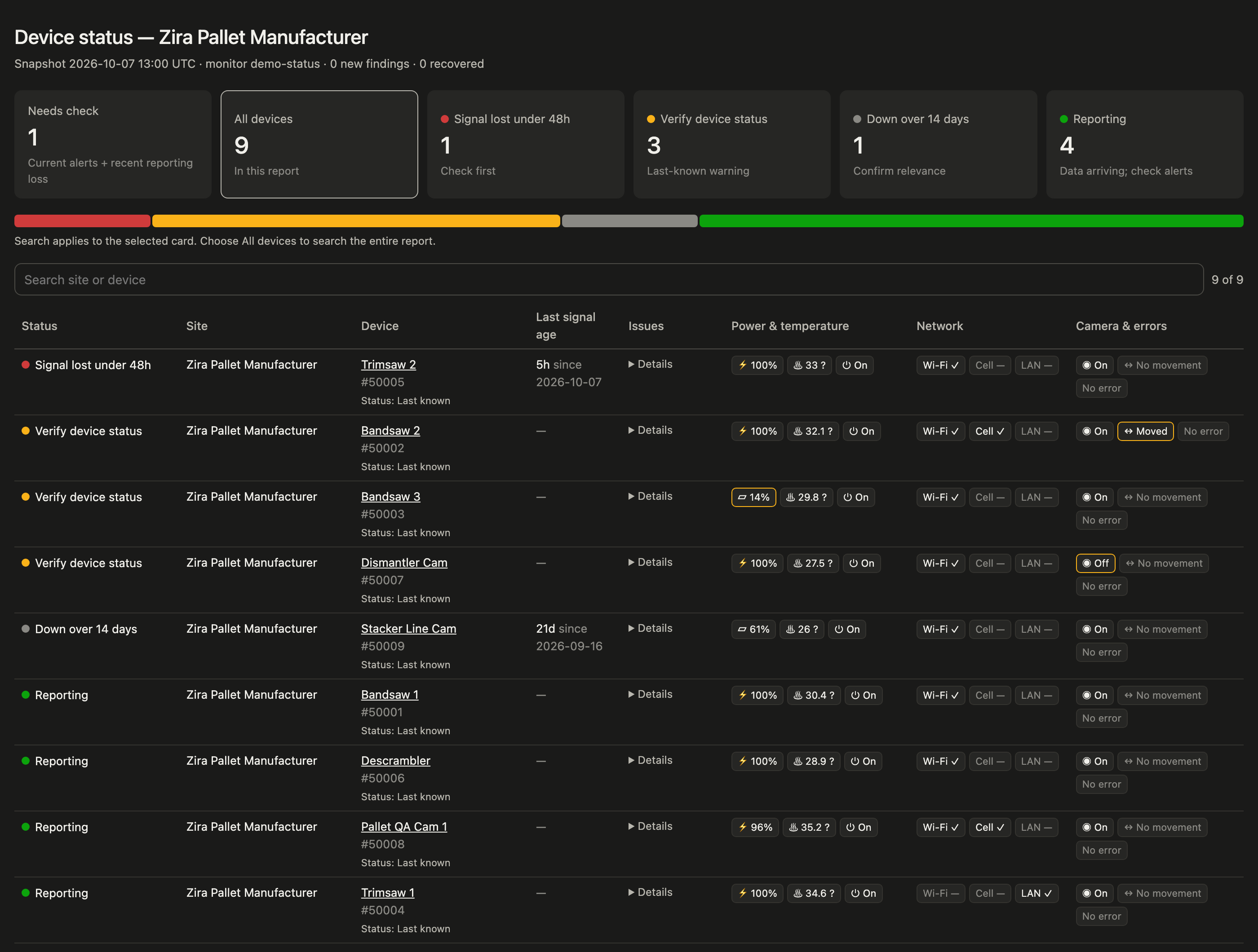
Zira checks every camera at your sites and shows its status on one page:
- Online or offline, with how long a camera has been quiet. Cameras that stopped recently come first.
- Battery and charging, with a warning when a battery is low and not charging.
- Temperature, power and device errors.
- Camera on or off, and camera moved, so you know when a camera needs to be pointed again.
- Wi-Fi, cellular and network cable.
You do not need to set up production counts or targets first. Ask "Check device status every weekday at 6:30" and Zira checks each morning, telling you only when a camera goes offline, comes back, or reports something new.
Weekly reports in a few questions
"Send me a weekly report for my saws."
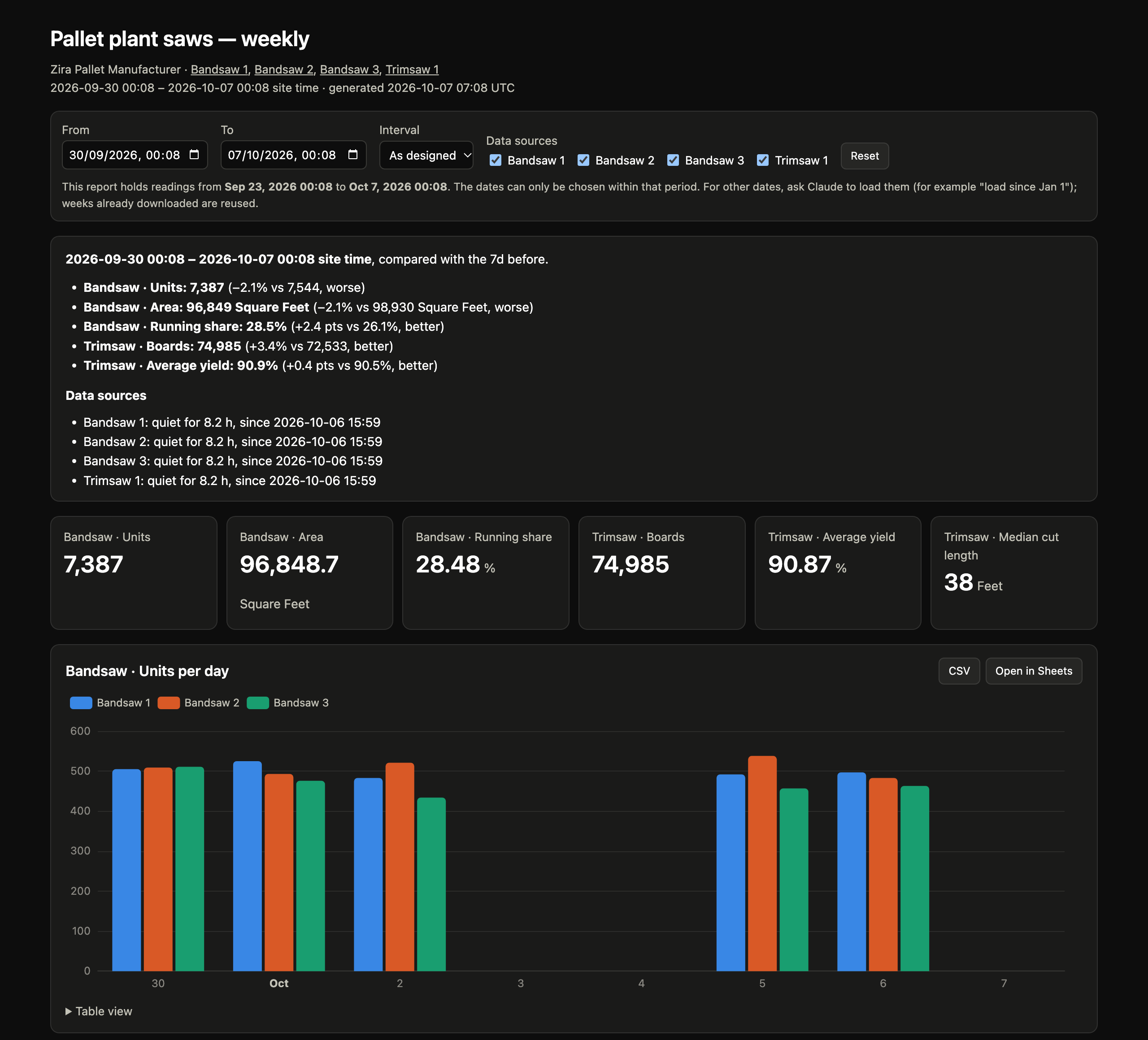
Pick the machines, and Zira recognizes each one: trimsaws, bandsaws, Pallet QA cameras and forms each get a ready-made report with the numbers that matter for them. Choose a day, a week or a month, and every report compares it with the one before:
- Output, yield, fail rate and running time, each marked better or worse.
- Days worth a look, such as a high fail rate, or long stops with no reason entered.
- Machines that went quiet, and since when.
- Charts you can explore, with CSV and Open in Sheets.
Zira runs it on the schedule you choose. In Claude, it can also keep a private page updated with the latest report, so you open the same link every week.
Health checks that stay quiet
"Check my Ohio sites' devices every morning."
Set up a daily health check for one site or all of them in a few questions. Each run updates the health dashboard. When nothing changed, Zira tells you so in one line.
Find more rare defects
"Find more raised nails for Cam 1 Quality."
Rare defects are hard to train for because there are so few examples. Zira searches your camera's recent production images for likely examples and opens a review page. You accept or reject each one, and Zira turns the accepted images into a dataset, ready for you to add to the camera in Zira. You can also check an existing dataset for labels that look wrong. This works with Pallet Vision cameras.
Test models on fresh production images
"How does the newest model do on yesterday's production?"
Score a Vision model on recent images from a Pallet Vision camera's production line, images it has never trained on, cut up the same way Zira prepares its training datasets.
See an AI report before you schedule it
- A sample first. Before a scheduled AI report is saved, Zira writes a sample in the chat, so you see what your team will receive.
- Fine-tune it in Zira. Open the draft in Zira's agent editor, change it there or in the chat, and schedule it when it reads right.
- End-of-day reports. Ask for "every day at 18:00 with today's data", and the report covers the day that is ending, not yesterday.
Getting started
Request beta access at sales@zira.us, then read the guide: