
Browse Guides
5 guides
3 guides
2 guides
13 guides
1 guide
9 guides
12 guides
2 guides
18 guides
1 guide
1 guide
1 guide
2 guides
1 guide
1 guide
1 guide
1 guide
1 guide
1 guide
1 guide
2 guides
2 guides
1 guide
AI-Pallet QA and Routing
Create an AI-Pallet QA and Routing data source when you want a pallet-focused AI workflow with a guided starting template.
Use AI-Pallet QA and Routing when you want a pallet-focused AI workflow for inspection, routing, and quality decisions.
This option is best when the workflow is already centered around pallet handling and you want to begin from a purpose-built AI template instead of a blank schema.
Choose AI-Pallet QA and Routing
- Open a channel.
- Click the Data Sources tab.
- Click Add Data Source.
- Choose AI-Pallet QA and Routing.
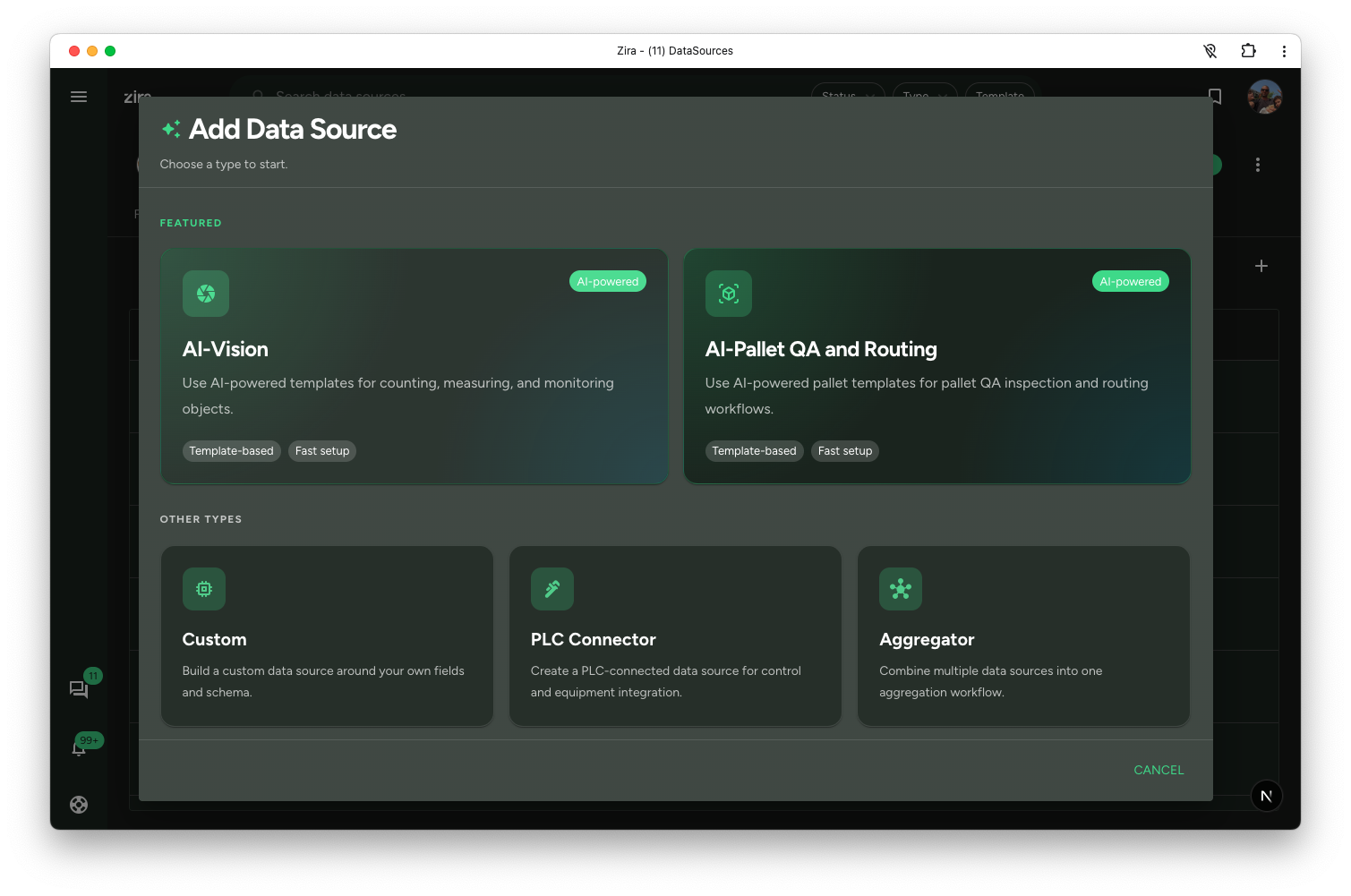
Start from the pallet template
- Review the available pallet templates.
- Select the one that matches the workflow you want.
- Enter the data source name.
- Click Create data source.
This path gives you a faster setup for pallet QA and routing work, so your team can begin from a workflow that already matches the device purpose.
Continue in the data source workspace
After creation, open the data source and review the structure that came with the selected template. From there, you can continue into the routing or QA pages that match your process.
Continue with guided setup
After the Pallet QA data source exists, you can use Home AI Assistant to guide setup and model improvement.
Ask:
- set up vision device
- what is next for this pallet vision data source?
- help me improve this pallet vision model
The assistant checks whether the device is paired and mounted, then guides you to the next useful tab.
For Pallet Vision, snapshots are usually uploaded automatically by the device. Because of that, the guided workflow focuses on:
- pairing and mounting status
- checking Live View when needed
- waiting for or reviewing validation snapshots
- copying useful examples into a dataset
- annotating and versioning the dataset
- training a model
- pushing the model to the device
- reviewing fresh validation snapshots and inspection results
Use the assistant again after each milestone if you want it to suggest the next step.
Read next
- Create a Data Source - Return to the main create flow.
- Home AI Assistant - Use guided setup for an existing Pallet Vision data source.
- Image Review - Review QA session images with overlays, inspection details, and marks.
- Video Review - Review recorded validation clips and add marks at the right moment.
- Routing - Continue with routing-related work after setup.
- Data Sources Tabs - Open the created data source from the channel table.